
Welcome to our Help Center! CloudX helps finance and accounting teams modernize operations with clean data-powered automation solutions built to digitize, automate, and monetize the back office. Here are the latest updates from our team.
This month’s CloudX release focuses on enhanced reporting capabilities designed to provide greater visibility into vendor spend, invoice volume, payment activity, and vendor data.
Reports
The APSmart® NextGen Reports Update provides details and screenshots for five reporting tools designed to support greater visibility and analysis across vendor and invoice activity, including:
These reports provide simple ways to review vendor spend, invoice volume, payment activity, vendor information, and trends over time. Depending on the report, users can filter data, customize fields and grouping, compare activity across companies, departments, and vendors, and generate or schedule reports based on their specific reporting needs.
You can access the NextGen Reports Update here:
This month’s CloudX release includes updates to archive management, dashboard performance reporting, and system reports to provide greater flexibility and visibility into invoice activity. Archive management and dashboard improvements are planned for release by the end of July.
Archive Management
Archive process enhancements will allow documents to retain their original document type. Users will also be able to change the archive reason and unarchive documents when needed.
Dashboard Improvements
Dashboard improvements will include a new KPI report that tracks the full lifecycle of invoices in the system. The report will include scheduling capabilities and historical data, with KPI results displayed visually through charts on the dashboard.
Reports
Four new reports have been added, including one pivot report:
Screen Enhancements & Corrections
Reported bugs have been corrected throughout the system.
This month’s CloudX release includes updates to PO invoice settings, access controls, and invoice page management to support more flexible invoice handling and user permissions.
System Parameters
New parameter settings have been added in APSmart to support PO invoice handling.
Security & Access
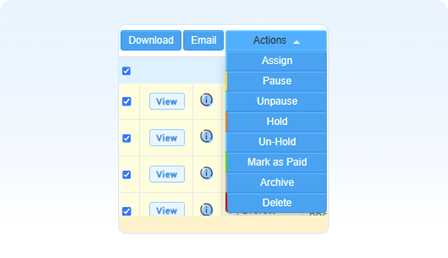
A new “Mark as Paid” action has been added to the APSmart Role tab in the Access screen.
Invoice Processing
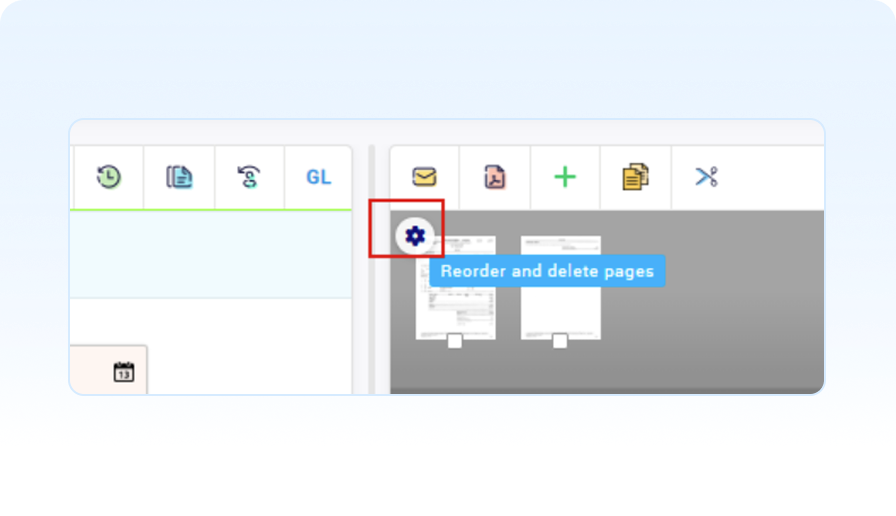
For invoices with multiple pages, users can now reorder or delete pages directly from the invoice screen.This update allows APSmart users to adjust the order of document pages displayed in the invoice image viewer.
This month’s APSmart release includes updates to system parameters, user preferences, statement processing, and invoice handling to support cleaner workflows, stronger validation, and more flexible settings.
System Performance
Additional business logic and filtering have been added for both CatchAll and Exception handlers.
This update allows invoices to be restricted and dispatched to the correct approver based on the first letter of the vendor name.
User Preferences
A preferred time zone setting has been added to user preferences. Reports will continue to be generated using the client’s time zone.
Statement Processing
Updated statement accept logic which requires all related invoices to be marked “Accepted.”
Ability to sort invoices by status in the invoices grid.
Correction of an image viewer issue when switching from an invoice image back to the statement image.
Invoice Processing
Validation has been added for resetting invoices associated with statements. When an invoice belonging to a statement is reset, the related statement will also be reset. Invoices associated with statements that are in the payment process cannot be reset. Invoices may now be submitted in Excel and image file formats, in addition to PDF file format.
This month’s APSmart release brings targeted updates that support a smoother user experience and stronger control across important system functions.
System Performance
Performance improvement in the Data Load screen
Security & Access
Single Sign-On (SSO) has been fully implemented, with exceptions available for select user types, including auditors, buyers, and vendors.
Workflow Enhancements
The Approval workflow now supports fallback rules on vendor assignment.
Statement Processing allows invoices to be disassociated (unlinked) without losing historical records.
Please Note:
This release is more for you than us! It will give you and your organization more control over the settings in APSmart/NextGen.
Security & Access
New settings available for password rules and retention, along with the ability to deactivate inactive users.
Payment Terms & Calculations
We normalize the payment terms received from vendors, providing you greater control over the methods used in comprehensive calculations.
Holiday Management
Yearly reminders to enter next year’s holidays. These reminders are applied to discount and due date calculations to help you save money and avoid late fees.
System Parameters
Added control over various system parameters, including time zone settings, code positioning in lists, archive reason naming, and more.
Screen Enhancements & Corrections
New category available in the Dashboard and improvements to PO invoices.
Please Note:
For Release — Upcoming
Updates Included in this Release
Dashboard improvements.
Updated business date handling, user settings, configuration, and logging for payments.
User-specific Home Page panel configuration.
Improved user settings, configuration, and logging sitewide.
Added ability to configure payment approval settings within the user interface, including:
GL slide import template: A pre-coded Excel file provided by the client is imported through the back end. The uploaded data is then available for selection and insertion on the GL slide via the Template button.
Process Statement, Claim, and Contracts from an Excel format.
Enabled payment approval directly from the Invoice Approval page when accessing an invoice through the Fund Approval page.
Subtotal (Total–Tax) appears as a tooltip when you hover over invoice total.
Required field validation added for PO line items on approval.
Comment column added to the My Queue screen.
Statement improvements: added Select All, filtering, and ability to keep selected items across pages when manually matching. Also added automatic matching when line items are updated.
GL codes filterable by company.
The Department field on the GL slide defaults to the value saved in the invoice header.
Added a GL code dropdown list for PO line items.
Control number field added to each PO line item to record RO numbers.
Updated business date handling for payments, plus improved user settings, configuration, and logging.
Added user-specific Home Page panel configurations and activity tracking, enabling personalized layouts and improved visibility into user actions.
Updated user settings, with enhancements including: GL code, division, department, maximum amount, and reassignment options.
Enhanced statement management, with improvements including: adding blanks, manual and automatic matching, and refined exception/accepted state handling logic.
Expanded workflow actions allowing users to move or copy items between approvers.
Added vendor filtering by company on the Invoice screen for easier navigation.
Added company field column to the Vendor Department section on Dataload.
Improved approval workflow display: the first company now expands by default, while remaining company workflows stay collapsed, allowing a cleaner view.